Neobrutalism in Web Design: The Anti-Design Trend Explained
Somewhere between the hostile rawness of early brutalist websites and the sterile polish of mainstream UI design, a new aesthetic carved out its territory. Neobrutalism in web design takes the confrontational honesty of brutalist graphic design and filters it through a lens of playfulness, saturated color, and genuine usability. The result is a style that looks intentionally rough but never punishes the user for engaging with it. It is one of the most distinctive graphic design trends to emerge in recent years — a bold entry in the broader landscape of graphic design styles — and its influence extends well beyond the niche corners of the internet where it first appeared.
What makes neobrutalism compelling is its refusal to choose between form and function. Traditional brutalist websites often treated usability as an afterthought — or, more accurately, as a casualty of ideological commitment to rawness. Neobrutalism rejects that trade-off. It keeps the thick borders, the visible structure, the deliberate imperfection, but it packages these elements into interfaces that people can actually navigate. The aesthetic is loud, but the experience is considered.
This is not a fleeting micro-trend. Neobrutalism has been adopted by major design tools, SaaS platforms, and creative agencies precisely because it solves a real problem: how to stand out in a digital landscape saturated with rounded corners, soft gradients, and indistinguishable interfaces. It offers personality without abandoning the user.
What Is Neobrutalism?
Neobrutalism — sometimes written as neo-brutalism or referred to as neo brutalism design — is the evolution of brutalist design into something more refined, more colorful, and more concerned with the person using the product. Where brutalism emerged as a reaction against the polished conventions of web design, neobrutalism is a reaction to brutalism’s own excesses. It asks: what if we kept the attitude but dropped the hostility?
The original wave of brutalist websites, catalogued on sites like brutalistwebsites.com from around 2014 onward, celebrated rawness as an end in itself. Default system fonts, unstyled HTML, deliberately broken layouts, and navigation schemes that required genuine effort to decode. The aesthetic was powerful, but it came with a cost. Many brutalist sites were difficult to use, inaccessible, and alienating to anyone outside the design community. The rawness was the message, and the message excluded most people.
Neobrutalism preserves the visual vocabulary — exposed structure, hard edges, visible UI elements — but applies it with intent rather than ideology. The borders are thick, but they create clear visual hierarchy. The layouts feel raw, but they follow logical patterns. The colors are bold and unconventional, but they maintain sufficient contrast for readability. It is brutalism that learned from user experience design without surrendering its identity.
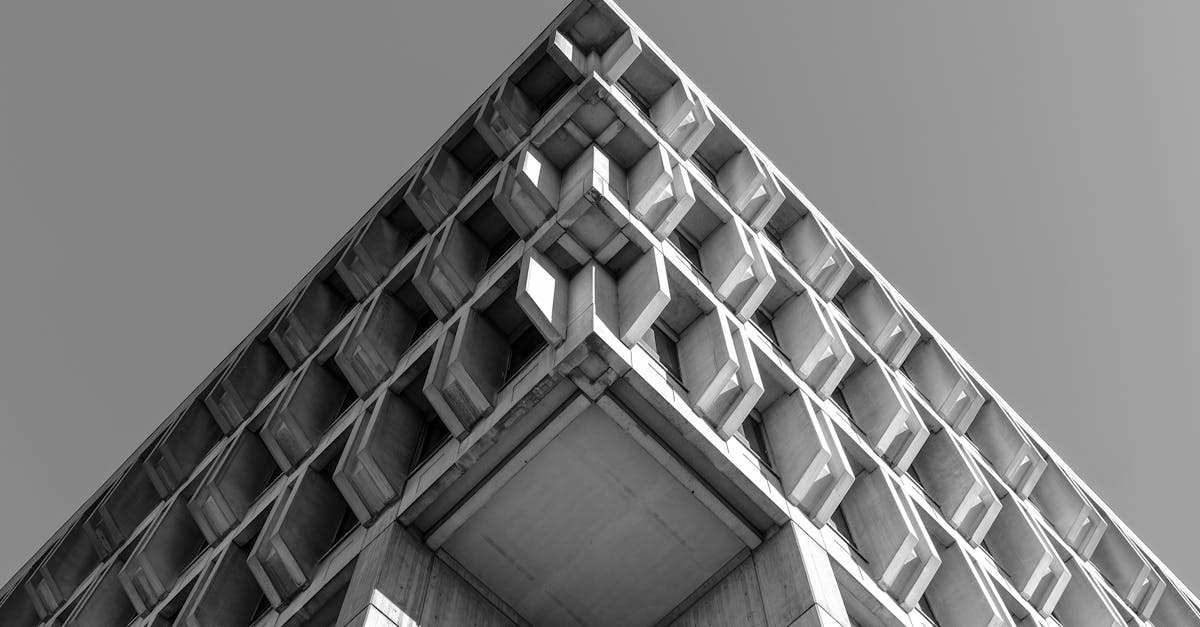
The shift mirrors what happened in architecture decades earlier. Brutalist buildings gave way to structures that referenced brutalist forms — raw concrete, exposed steel, blocky massing — but incorporated them into spaces designed for comfort and human interaction. Neobrutalism in web design follows the same trajectory: keeping the bones visible while making the space livable.
Key Visual Characteristics
Neobrutalist design is immediately recognizable. Its visual language is distinctive enough that even non-designers can spot it, yet it remains flexible enough to accommodate a wide range of brands and applications. Several core characteristics define the style.
Hard Drop Shadows
The single most recognizable trait of neobrutalist web design is the hard drop shadow — a solid, offset shadow with no blur, no feathering, and often rendered in a bold color rather than the conventional grey or black. These shadows create a sense of depth that feels more like stacked paper cutouts than the subtle elevations of material design. They are flat yet dimensional, graphic yet functional, and they give every element a sense of physical weight on the page.
Thick Black Borders
Neobrutalist interfaces frame nearly everything in solid, thick black strokes. Buttons, cards, input fields, images — all receive the same bold outline treatment. This approach makes every element feel deliberately placed and structurally defined. It is the visual equivalent of showing your work in a math equation: nothing is hidden, nothing floats ambiguously.
High-Contrast Color Palettes
Color in neobrutalism is saturated, unapologetic, and often unexpected. Bright yellows, hot pinks, electric blues, and vivid greens appear in combinations that would be considered garish in conventional UI design. The palettes frequently pair a stark white or off-white background with two or three high-saturation accent colors, creating layouts with strong visual contrast that demand attention without sacrificing legibility.
Visible UI Elements
Where mainstream design trends toward making interface elements feel invisible — seamless transitions, ghost buttons, hairline dividers — neobrutalism does the opposite. Buttons look unmistakably like buttons. Form fields have visible borders. Toggles, checkboxes, and sliders are rendered as graphic objects with presence and weight. The interface does not try to disappear; it announces itself.
Flat Illustrations with Bold Outlines
Illustration in neobrutalist design tends toward a specific style: flat color fills, thick black outlines, simplified forms, and a slightly naive quality that echoes editorial cartooning or indie comic art. The illustrations feel handmade even when they are digitally produced, reinforcing the anti-corporate personality of the aesthetic.
Monospace and Display Typography
Type choices in neobrutalism lean toward two poles. Monospace fonts — the typefaces traditionally associated with code editors and terminals — bring a utilitarian, system-level feel. Display typefaces — oversized, bold, and often geometrically rigid — provide the impact. Both choices reject the safe middle ground of the web-standard sans-serif that dominates most interfaces.
Intentionally Undesigned Aesthetic
The overall impression of a neobrutalist interface is that it was designed to look undesigned. Elements feel hand-placed rather than algorithmically optimized. Spacing may be generous or tight, but it never feels templated. The aesthetic signals authenticity and human presence, which is precisely why it appeals to audiences fatigued by pixel-perfect sameness.
Notable Examples
Neobrutalism has moved well beyond experimental portfolios and design-community side projects. Several widely recognized products and platforms have adopted elements of the style, bringing it into mainstream visibility.
Figma was among the first major design tools to incorporate neobrutalist elements into its brand and marketing. Figma’s website and promotional materials began featuring thick-bordered cards, bold drop shadows, and high-contrast color blocks that read as distinctly neobrutalist. For a tool used by millions of designers, this aesthetic choice sent a signal: design does not have to look like every other SaaS landing page to be taken seriously. The playfulness of the visual language reflected Figma’s collaborative, irreverent brand personality.
Gumroad undertook one of the most visible neobrutalist redesigns in the industry. Under Sahil Lavingia’s direction, Gumroad’s interface shifted from a conventional, polished SaaS aesthetic to a strikingly raw design featuring thick black outlines, flat pastel color fills, hard-edged shadows, and a general sense of graphic directness that set it apart from every other e-commerce platform. The redesign was polarizing — some users found it refreshing, others found it distracting — but it accomplished what every brand redesign hopes to achieve: it made Gumroad instantly recognizable and generated enormous discussion about what product design could look like.
Beyond these flagship examples, neobrutalism has permeated the SaaS landing page ecosystem broadly. Startups in productivity, developer tools, and creative software have adopted hard shadows, bold borders, and saturated color palettes as a way to differentiate against the sea of identical websites built from the same Tailwind templates. The style has become a shorthand for “we are different,” which works precisely as long as it remains a minority approach.
The rise of neobrutalist component libraries — open-source UI kits built specifically in this style — has further accelerated adoption. Libraries for React, Tailwind CSS, and Figma have made it possible for developers and designers to build neobrutalist interfaces without crafting every element from scratch, lowering the barrier to entry and ensuring the style appears across an increasingly wide range of products.
Neobrutalism vs Brutalism vs Minimalism
Understanding neobrutalism requires positioning it against the two styles it borrows from and reacts against. Brutalism, minimalism, and neobrutalism share certain overlapping concerns — all three value honesty in some form — but they diverge sharply in how they achieve it and what they prioritize.
Brutalism values rawness above all else. Its commitment is to exposing structure, rejecting polish, and confronting the viewer. Usability is not a primary concern — and in some cases, poor usability is the point. Brutalist design says: the web is a medium with its own material properties, and we should stop disguising them. Color palettes tend to be harsh or monochromatic. Typography is utilitarian. The experience is deliberately uncomfortable.
Minimalism values reduction. It strips away everything that is not essential, creating interfaces that feel effortless and clean. Usability is central, but the visual personality is subdued. Minimalist design says: the best interface is one you barely notice. The palette is neutral. The typography is refined. The experience is frictionless — and, increasingly, interchangeable.
Neobrutalism occupies the ground between these two. It borrows brutalism’s visual boldness — thick borders, exposed structure, willingness to break convention — but applies minimalism’s concern for usability and user experience. Neobrutalist design says: an interface can have personality and rawness without being hostile, and it can be usable without being boring. The palette is vibrant — closer in spirit to maximalist design than to either of its neighbors. The typography is expressive. The experience is engaging but navigable.
The practical difference is most visible in how each style handles a simple button. A minimalist button might be a text link or a subtle pill-shaped element with a gentle hover state. A brutalist button might be an unstyled HTML element or raw text with no affordance at all. A neobrutalist button has a thick black border, a solid colored fill, a hard offset shadow, and an unmistakable clickable presence. It is the loudest of the three, yet it communicates its function most clearly.
Typography in Neobrutalism
Type is a load-bearing element in neobrutalist design — not merely a vehicle for content but a graphic element in its own right. The typographic choices in neobrutalist work are as deliberate and personality-driven as the color palettes and border treatments.
Bold sans-serif typefaces dominate headlines. These are not the neutral, Swiss-school sans-serifs that define corporate web design. Instead, neobrutalism favors geometric or grotesque faces with strong character — typefaces that feel assertive and slightly unusual. Weight is pushed to the extremes: extra-bold, black, or ultra-wide cuts appear frequently, turning headlines into visual anchors that ground the entire composition.
Monospace fonts serve as a secondary typographic layer, often used for labels, metadata, navigation, or body text in contexts where a system-level, utilitarian feel is desired. The association with code editors and terminal interfaces gives monospace type an inherent authenticity within the neobrutalist framework — it reads as honest, functional, and unadorned. Fonts like JetBrains Mono, IBM Plex Mono, and Space Mono are common choices.
Oversized typography is another hallmark. Headlines may occupy half the viewport or more, functioning as both text and graphic element. This approach treats type the way a poster designer would — as a form that fills space and creates visual impact before it is even read as language. The scale is intentional: it demands attention and establishes hierarchy through sheer presence rather than through subtle size increments.
What neobrutalist typography avoids is equally telling. You will rarely see script fonts, delicate serifs, or the refined typographic pairings that characterize luxury or editorial design. The type must feel accessible, direct, and slightly rough around the edges — a voice that speaks plainly rather than one that whispers elegantly.
How to Create a Neobrutalist Design
Building a neobrutalist interface is less about following a rigid formula and more about internalizing a set of principles and applying them with consistency. That said, certain practical starting points make the process more approachable, especially for designers accustomed to conventional UI patterns.
Start with thick borders and hard drop shadows. These two elements are the foundation of the neobrutalist look. Apply a 2-4 pixel solid black border to every major UI element — cards, buttons, inputs, image containers. Add an offset shadow (typically 4-8 pixels in both the x and y direction) with no blur and a solid fill, either black or a bold accent color. This single step transforms an otherwise generic layout into something that reads as distinctly neobrutalist.
Choose 3-4 high-contrast colors. Select a background color (white, off-white, or a pale tint), a primary accent (something bold — bright yellow, hot pink, electric blue), a secondary accent (a contrasting saturated hue), and black for borders and text. Avoid gradients, transparency, and muted tones. The palette should feel flat, bold, and graphic. Every color should hold its own against the thick black outlines.
Keep layouts grid-based but intentionally raw. Neobrutalist layouts work best on strong, visible grids. Cards, sections, and content blocks should feel structured and deliberate. However, the grid should not be hidden. Let the borders and shadows reveal the underlying structure. Align elements consistently, but allow the visual weight of borders and shadows to create the sense of controlled roughness that defines the style.
Use system-inspired UI elements. Buttons should look like buttons. Toggles should look like toggles. Draw from the visual language of early operating systems — elements that communicated their function through clear visual affordances rather than through learned conventions. This approach honors the graphic design principles of clarity and communication while maintaining the neobrutalist aesthetic.
Select typography with character. Pair a bold, geometric sans-serif for headlines with a monospace font for supporting text. Set headlines large — larger than feels comfortable in conventional UI design. Let the type carry visual weight and personality. Avoid typographic subtlety; neobrutalism rewards directness.
Resist the temptation to soften. The most common mistake in neobrutalist design is undermining the style with conventional finishing touches — adding border-radius to soften corners, using blurred shadows instead of hard offsets, or muting the color palette. The sharpness is the point. If the design does not feel slightly confrontational, it has drifted back toward the mainstream.
When Neobrutalism Works (and When It Does Not)
Neobrutalism is not a universal solution. Like any strong aesthetic, it carries associations and connotations that serve some contexts brilliantly and undermine others. Knowing when to deploy it — and when to reach for a different approach — is as important as knowing how to execute it.
Where neobrutalism works well:
Tech products and developer tools are a natural fit. The style’s system-level aesthetics, monospace typography, and visible-structure philosophy align with how technical audiences think about software. It signals transparency, directness, and a lack of pretension — values that resonate strongly with developers and designers.
Creative portfolios benefit from neobrutalism’s ability to communicate personality instantly. A portfolio that uses thick borders, bold color, and hard shadows tells a prospective client that the designer has opinions and is not afraid of them. In a field where every other portfolio site uses the same minimal template, neobrutalism is a powerful differentiator.
SaaS products and startups use neobrutalism to stand apart in crowded markets. When every competitor’s landing page features soft illustrations, rounded buttons, and the same blue-purple gradient, a neobrutalist approach creates immediate visual distinction. It signals that the product — like the design — does things differently.
Editorial and content platforms can leverage the style’s graphic boldness to create layouts that feel more like magazine spreads than conventional blog posts. The strong typographic hierarchy and visible structure of neobrutalism lend themselves to content-heavy interfaces where visual energy helps sustain reader engagement.
Where neobrutalism does not work:
Luxury brands require an aesthetic vocabulary built on refinement, subtlety, and restraint. The thick borders and hard shadows of neobrutalism read as deliberately unpolished — the opposite of what luxury customers expect. A high-end jewelry brand or fashion house adopting this style would create a jarring disconnect between product positioning and visual presentation.
Healthcare and medical interfaces need to prioritize trust, calm, and accessibility. The visual intensity of neobrutalism can feel aggressive in contexts where users are anxious, vulnerable, or navigating critical information. The style’s boldness, which reads as confident in a SaaS context, reads as insensitive in a healthcare one.
Financial services and banking depend on visual signals of stability, security, and conservatism. The deliberately unconventional look of neobrutalism undermines the trust cues that financial users rely on. People entrusting their money to an institution want an interface that feels established and reliable, not one that looks like it was designed to provoke.
Government and institutional sites serve broad, diverse audiences with varying levels of digital literacy. The strong visual opinions embedded in neobrutalism can alienate users who simply need clear, neutral access to information and services. These contexts call for design that steps aside and lets the content lead — the kind of neutral clarity described in foundational graphic design practice.
FAQ
What is the difference between brutalism and neobrutalism in web design?
Brutalism in web design embraces rawness as its primary value, often at the expense of usability. It uses unstyled HTML, default system fonts, and deliberately hostile navigation. Neobrutalism retains the visual boldness of brutalism — thick borders, visible structure, unconventional aesthetics — but combines it with genuine usability and vibrant color palettes. Think of brutalism as the punk original and neobrutalism as the refined descendant that kept the attitude but learned to communicate with a broader audience.
Is neobrutalism just a passing trend?
While trends in web design are inherently cyclical, neobrutalism has shown more staying power than most micro-trends. It emerged around 2020-2021 and continues to influence product design, component libraries, and brand identities years later. Its longevity is partly because it addresses a genuine gap in the design landscape: the need for visual personality in an era of homogeneous interfaces. Whether it endures as a named style or simply becomes absorbed into the broader vocabulary of web design, its influence on how designers think about borders, shadows, and color is likely permanent.
Can neobrutalism be accessible?
Yes, and this is one of the key distinctions between neobrutalism and its brutalist predecessor. Neobrutalist designs, when executed thoughtfully, can meet accessibility standards. The thick borders and high-contrast color palettes actually support accessibility in some respects — elements are clearly delineated and highly visible. The main accessibility risks lie in color choices (ensuring sufficient contrast ratios between text and backgrounds) and in ensuring that the visual boldness does not interfere with screen reader navigation or keyboard accessibility. The style’s emphasis on clearly visible, well-defined UI elements can actually make interfaces more accessible than designs that rely on subtle visual cues.
What tools and frameworks support neobrutalist design?
Several CSS frameworks and component libraries have been developed specifically for neobrutalist interfaces. Tailwind CSS is commonly used as a foundation, with custom utility classes added for hard shadows and thick borders. Dedicated libraries like Neobrutalism Components, BrutalistUI, and various open-source Figma kits provide pre-built elements. Standard design tools like Figma, Sketch, and Adobe XD all support the style natively — the key techniques (solid borders, offset shadows without blur, flat color fills) are basic features in any modern design application. The low technical barrier is part of what has made the style so widely adopted.