Pixel Fonts: Retro & Digital Typefaces for Modern Design
Pixel fonts are typefaces built on a visible grid of square units — the typographic equivalent of pixel art. Where most modern type is constructed from smooth vector curves that scale infinitely, a pixel font renders each letterform as a deliberate arrangement of tiny blocks. The result is a distinctive aesthetic that recalls early computing, arcade cabinets, and the visual culture of 8-bit digital media. What began as a technical necessity has evolved into a deliberate design choice that carries specific cultural meaning in typography and visual communication.
For designers working in gaming, retro branding, chiptune music, or any context that references digital culture’s roots, pixel typefaces are not merely decorative — they are functionally appropriate. This guide covers what pixel fonts are, where they come from, which ones are worth using, and how to deploy them effectively in modern design and web projects.
What Are Pixel Fonts?
A pixel font is a typeface in which each character is designed on a fixed grid, with every element occupying whole grid squares rather than smooth curves. In technical terms, these are bitmap-based letterforms — each glyph is a small raster image composed of a predetermined number of pixels in width and height. At their native resolution, pixel fonts are perfectly sharp. Scale them up, and the grid becomes visible as a deliberate design element. Scale them down below their intended size, and they become illegible.
The construction grid varies. The simplest pixel fonts use a 5×7 grid — the minimum needed for a legible Latin alphabet. Arcade classics often used 8×8 grids, allowing for better proportioning. More elaborate bitmap fonts work on larger grids — 16×16 or beyond — permitting smoother diagonals and refined details while maintaining the visible grid.
Modern pixel fonts exist in a practical middle ground. Many are distributed as vector files (OpenType or TrueType), meaning the square pixels are drawn as tiny vector rectangles. This gives designers the flexibility to scale them while preserving the crisp, grid-aligned appearance. The aesthetic is bitmap; the technology is vector.
A Brief History of Pixel Fonts
Every typeface displayed on a screen before the mid-1990s was, by necessity, a pixel font. In the 1970s, personal computers and terminal displays operated at resolutions so low that characters had to be hand-designed on grids as small as 5×5 pixels. The designers were engineers solving a rendering problem: curves were approximated with stepped diagonals, strokes were uniform, and every character occupied the same fixed width.
The 1980s brought home computing and console gaming, producing some of the most iconic pixel typography. The Commodore 64’s PETSCII character set, the Apple II’s bitmap font, and the NES’s tile-based text all established visual languages that entire generations absorbed. Susan Kare’s work on the original Macintosh system fonts — Chicago, Geneva, Monaco — was a breakthrough, proving that 8-bit fonts could have genuine personality and typographic hierarchy.
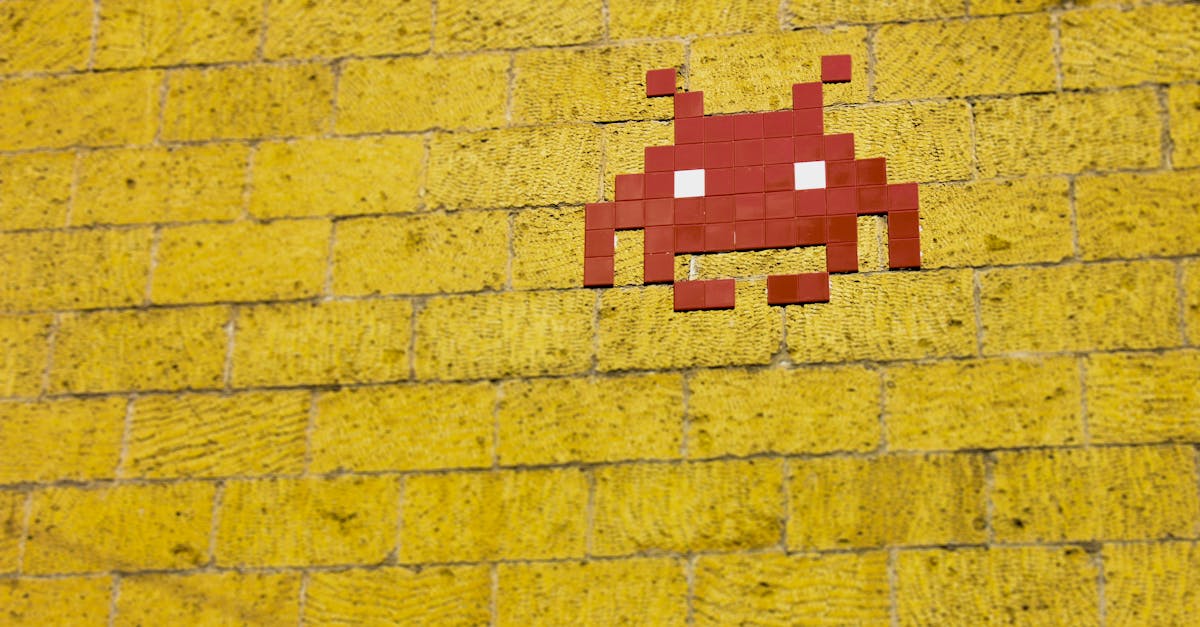
Arcade typography deserves particular note. The constraints of arcade hardware produced efficient, recognizable pixel lettering. Games like Space Invaders and Pac-Man had distinctive text styles that were as much part of the game’s identity as its sprites or sounds — a fact modern designers leverage when invoking that era through various graphic design styles.
The early web of the mid-1990s saw a brief pixel font renaissance, as designers crafted bitmap typefaces optimized for screen rendering at specific small sizes. By the 2010s, technical necessity had disappeared, but the aesthetic had become a cultural marker. The rise of indie gaming and chiptune music brought pixel fonts back as a deliberate choice communicating digital heritage and craft.
Types of Pixel Fonts
Low-Resolution (5×7, 8×8 Grids)
The most iconic pixel typefaces — built on grids of 5×7 or 8×8 pixels with no real curves, only visible staircases of blocks. These have the rawest, most mechanical quality and work best at large display sizes where the grid is clearly visible and the nostalgia factor is strongest.
Medium-Resolution
Working on grids of roughly 10×10 to 16×16 pixels, these offer smoother curves, possible stroke weight variation, and room for details like serifs or decorative elements. Recognizably “pixel” but with enough refinement to feel designed rather than purely constrained.
High-Resolution Pixel
Built on grids of 24×24 pixels or larger, these maintain grid-based construction while allowing for detailed letterforms. At small display sizes, they can look almost conventional; the pixel grid only becomes apparent when scaled up. Useful for body text in thematically appropriate contexts like game interfaces.
Pixel-Inspired Vector Fonts
Conventional vector designs that mimic the pixel look using small squares and stepped edges without an actual bitmap grid. Fully scalable and smooth at any size, though they can feel like an imitation to audiences familiar with genuine pixel type. A pragmatic choice for print and large-format work.
Best Pixel Fonts
The following selection covers the most useful pixel typefaces available, from free Google Fonts options to fonts with lasting cultural significance.
Press Start 2P
The definitive retro arcade pixel font. Designed by CodeMan38 and based on Namco’s 1980s arcade typography, it is built on an 8×8 pixel grid and captures the exact feel of late-1980s arcade screens. Available free through Google Fonts. Best reserved for short headlines — the heavy, uniform construction makes extended reading difficult.
VT323
Peter Hull’s recreation of the DEC VT320 terminal font captures terminal typography — monospaced, slightly condensed, with a technical precision that anyone who used a VT terminal will recognize. More legible than most retro pixel typefaces because terminal fonts were built for extended reading of code. Free on Google Fonts.
Silkscreen
Designed by Jason Kottke as a pixel-perfect bitmap font optimized for rendering at 8 pixels. Every character was hand-tuned for sharpness without anti-aliasing. Comes in regular and bold. While its original small-screen purpose is less relevant on modern displays, it remains a beautifully crafted pixel font that looks excellent at larger sizes.
Pixelify Sans
A newer Google Fonts addition by Stefie Justprince. It takes a friendlier approach than Press Start 2P, with slightly rounded shapes and proportional spacing. Available in weights from Regular to Bold — unusual for pixel fonts and practically versatile. Good for projects wanting pixel character without aggressive retro connotations.
Chicago
Susan Kare’s 1984 Macintosh system font is one of the most historically significant pixel art fonts ever designed. It delivered genuine personality — warm, slightly quirky, immediately legible — within severe technical constraints. Later used for the original iPod interface. Not freely available for commercial use, but an essential reference point for understanding pixel type as craft.
Munro
Designed by Ten by Twenty, Munro emphasizes legibility within the bitmap grid. Available in Regular, Narrow, and Small variants, it offers more flexibility than most pixel typefaces. Well-proportioned and consistent without a strong retro or arcade connotation — a practical workhorse.
Visitor
A compact, minimalist pixel font on a tight grid. Characters use the minimum pixels needed for legibility, giving it a dense, technical quality suited to game HUD elements and data displays. Unusually, it includes a serif variant for more typographic range within a pixel-based system.
Commodore 64 Inspired Options
Fonts like C64 Pro and Pet Me faithfully recreate the Commodore 64’s PETSCII character set, including its unique block graphics characters. Ideal for chiptune album art, retro computing interfaces, or designs targeting audiences with C64 nostalgia. The appeal is narrow but deep.
Using Pixel Fonts in Modern Design
Pixel fonts carry strong cultural associations, and their effectiveness depends on deploying them where those associations add meaning. Gaming is the most natural context — pixel type signals membership in a visual tradition that gaming audiences recognize and value. Indie studios in particular embrace pixel typography as part of a broader retro aesthetic signaling craft and connection to gaming’s roots.
Retro branding is another strong use case. Brands targeting millennials and Gen Z use pixel type to signal nostalgia for 1980s and 1990s digital culture. Streetwear labels, music festivals, and tech startups have all used pixel typography to differentiate from the clean sans serif homogeneity dominating contemporary branding. Music and event design benefit similarly — chiptune and electronic music scenes have long used pixel fonts on album art and social media graphics, where the connection between pixel type and electronic sound feels natural.
Social media is a growing application. The distinctiveness of pixel fonts makes them effective pattern-breakers in feeds dominated by smooth, high-resolution imagery. A well-executed pixel headline in an Instagram post stands out precisely because it contrasts with the platform’s visual norms.
One rule applies everywhere: use pixel fonts for display and headlines, never body text. The grid-locked construction makes extended reading uncomfortable. Treat them as display typefaces — titles, headings, callouts — and pair with a readable companion. Understanding font pairing principles is essential for making pixel fonts work in any layout with more than a few words.
Pixel Fonts in Web Design
Pixel fonts on the web require specific technical attention. The grid-based nature of pixel type means rendering quality depends heavily on display size, anti-aliasing settings, and CSS configuration.
Sizing is critical. Pixel fonts must be displayed at their native size or exact integer multiples. A font designed on an 8-pixel grid should be set at 8px, 16px, 24px, or 32px. Non-multiples force the browser to interpolate between grid points, producing blurred letterforms. Use pixel units (px) rather than relative units (em, rem) for precise grid alignment.
Anti-aliasing is the enemy. Modern browsers smooth text edges, which is destructive for pixel fonts. Setting -webkit-font-smoothing: none; and -moz-osx-font-smoothing: unset; disables smoothing for specific elements, restoring crisp pixel edges. The CSS image-rendering: pixelated; property helps when pixel fonts are rendered within canvas elements or as images, forcing nearest-neighbor scaling.
Test across screen densities. On 2x Retina displays, doubling the intended pixel size (16px for an 8-pixel-grid font) typically produces the best results. Pixel font files tend to be small — simple vector rectangles rather than complex curves — making them efficient for responsive web design projects where loading performance matters.
Pairing Pixel Fonts
Pixel fonts demand careful pairing because their visual personality is so distinctive. The blocky aesthetic creates strong contrast with virtually any other typeface, and managing that contrast is the central challenge.
Clean sans serif fonts are the most reliable partners. The neutrality of a well-designed sans serif — Inter, Roboto, Helvetica — provides a calm counterpoint to the aggressive texture of pixel letterforms. Both are fundamentally screen-native traditions, giving them shared context despite dramatic differences in construction. Use the pixel font for headlines, the sans serif for body text.
System sans serifs like San Francisco or Segoe UI create a subtle dialogue between historical and contemporary digital typography, reinforcing the retro-modern narrative many pixel font projects aim to create. Monospaced fonts can work as secondary companions in tech-themed designs, since the monospaced tradition shares heritage with pixel fonts through early terminal displays.
Avoid pairing pixel fonts with ornate, decorative, or script typefaces. The contrast is too extreme — pixel type speaks to digital culture while scripts reference calligraphic traditions. The combination reads as confused rather than intentional. Keep pairings simple: pixel font for display, clean sans serif for everything else.
Frequently Asked Questions About Pixel Fonts
What is a pixel font?
A pixel font is a typeface designed on a fixed grid of square units, where every element occupies whole grid squares rather than smooth curves. Originally created for low-resolution screens and gaming consoles, pixel fonts are now used as a deliberate aesthetic choice referencing digital heritage. Modern versions are typically distributed as vector files with square-shaped paths that replicate the bitmap look while allowing flexible scaling.
Are pixel fonts free?
Many quality pixel fonts are free. Google Fonts offers Press Start 2P, VT323, and Pixelify Sans, all open-source and free for commercial use. Additional free options are available through dafont.com and Font Squirrel. Premium pixel fonts with extensive character sets or multiple weights are available from independent foundries, but free options cover most use cases.
Can I use pixel fonts on websites?
Yes. Pixel fonts can be implemented through standard CSS @font-face declarations or services like Google Fonts. They require specific attention to render correctly: display at integer multiples of the design grid size, disable anti-aliasing via CSS font-smoothing properties, and test across screen densities. When configured properly, pixel fonts render crisply and their small file sizes make them performant.
What size should pixel fonts be displayed at?
Always use exact integer multiples of the font’s design grid. An 8-pixel-grid font should be set at 8px, 16px, 24px, 32px, and so on. Non-multiples cause the renderer to interpolate between grid points, producing blurred letterforms. On high-DPI displays, account for the device pixel ratio: on a 2x Retina screen, 16px CSS size corresponds to 32 physical pixels, suiting fonts designed on an 8 or 16 pixel grid.