Dashboard Design Principles That Work
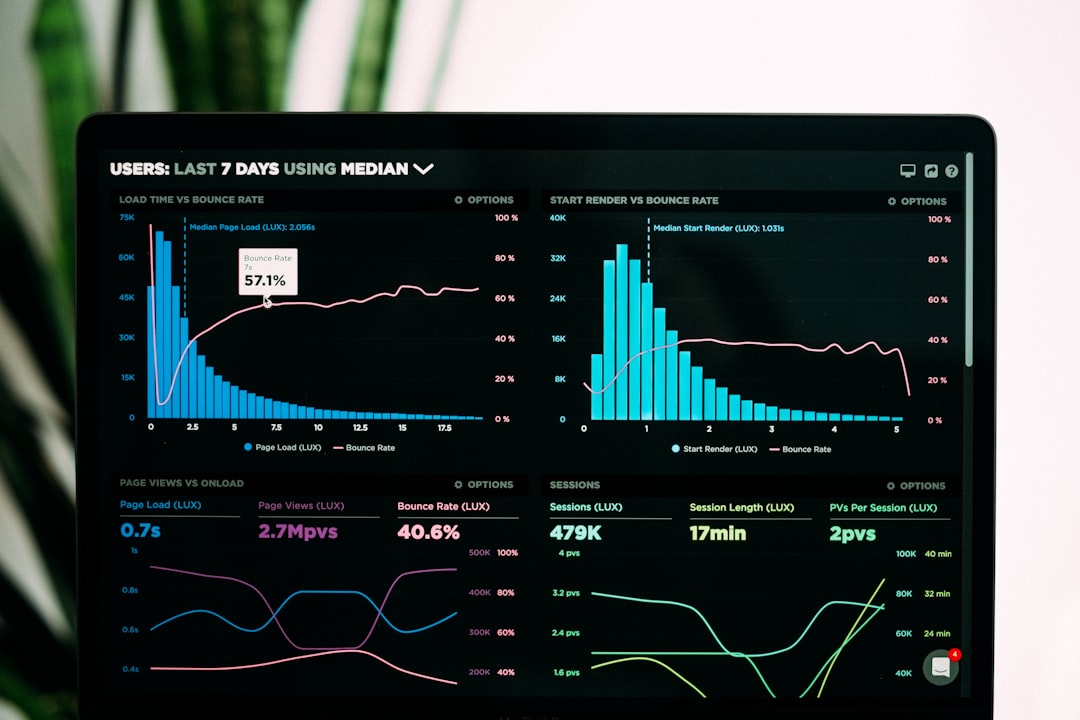
A dashboard is read in glances, not study sessions. Someone opens it to answer one question — are we on track, what changed, where is the problem — and a well-built dashboard answers in seconds. Good dashboard design principles exist because data alone does not communicate; arrangement, emphasis, and chart choice do. A cluttered dashboard with every possible metric is worse than a focused one, because it buries the signal the viewer actually needs.
The key principles of dashboard design
These seven principles apply whether you are building an analytics dashboard, an executive summary, or an operational monitor. They turn raw data into something a person can act on quickly.
| Principle | Why it matters |
|---|---|
| Lead with the key metric | The most important number should be seen first |
| Clear visual hierarchy | Size and position tell the eye what matters most |
| Right chart for the data | Each chart type answers a specific kind of question |
| Minimize clutter | Removing non-data ink makes real values pop |
| Consistent grid and layout | A predictable structure speeds up scanning |
| Scannable groupings | Related metrics read together as a story |
| Color used for meaning | Restrained, purposeful color encodes status |
1. Lead with the most important metric
Before laying out a single chart, decide what one question this dashboard answers. That metric — revenue, uptime, conversion, whatever the audience opens the screen to check — gets the most prominent position, usually top-left where reading begins, and the largest visual weight. Everything else supports or explains it. Dashboards drift into uselessness when every metric is treated as equally urgent, so force a ranking before you design.
2. Build a deliberate visual hierarchy
Viewers do not read a dashboard left to right like prose; they jump to whatever is biggest and boldest. Use size, weight, and placement to guide that jump in the order that serves the user. Headline numbers large, supporting charts medium, footnotes small. Strong visual hierarchy is what separates a dashboard people understand instantly from one they have to decode. Position and contrast do most of this work before color is even involved.
3. Pick the right chart for the question
Each chart type answers a different question. Lines show change over time, bars compare categories, a single big number shows a current value, and a small table is best for precise figures people will read individually. Pie charts work only for a few parts of a whole and fail past three or four slices. The mistake is choosing a chart for visual variety rather than for the comparison the data demands — match the form to the question every time.
4. Maximize the data-ink ratio
Every gridline, heavy border, drop shadow, and 3D effect competes with the data for attention. Edward Tufte’s idea of the data-ink ratio is a useful discipline: remove anything that is not conveying information. Drop redundant axis labels, lighten gridlines, kill background fills, and let the values themselves carry the chart. The result is cleaner, faster to read, and more honest, because decoration can distort how magnitudes are perceived.
5. Use a consistent grid and layout
Align tiles to a grid so the dashboard reads as an organized whole rather than scattered widgets. Consistent spacing, matching tile sizes for peer metrics, and a repeating structure let regular users build muscle memory for where things live. Generous white space between groups gives the eye room and signals which metrics belong together, doing the grouping work without heavy borders or boxes.
6. Group related metrics so the page tells a story
A dashboard is more than a collection of numbers; it should read as a narrative. Cluster acquisition metrics in one zone, engagement in another, revenue in a third, so the viewer can scan section by section. Proximity communicates relationship — figures placed near each other are assumed to be connected. Order the zones so the most decision-relevant story comes first and the supporting detail follows.
7. Reserve color for meaning
Color is the easiest thing to overuse and the most powerful when restrained. Use a neutral base palette for most of the dashboard and save saturated color for status — red for breached thresholds, green for healthy, a single accent for the highlighted metric. When everything is colorful, nothing signals. Keep color encoding consistent across the dashboard and pair it with text or shape so color-blind users get the same message.
Common dashboard design mistakes to avoid
- Showing every available metric instead of the few that drive decisions.
- Choosing chart types for variety rather than for the comparison the data needs.
- Drowning data in gridlines, borders, shadows, and 3D effects.
- Using color decoratively so that meaningful status colors lose their signal.
Frequently Asked Questions
What are the most important dashboard design principles?
The most important principles are leading with the key metric, establishing clear visual hierarchy, and choosing the right chart for each question. Together they ensure a viewer finds the answer they came for in seconds, while clutter reduction and purposeful color keep the signal clean.
How many metrics should a dashboard show?
Show only the metrics that support the decision the dashboard exists for, typically a handful of headline figures plus a few supporting charts. If a number does not change what a viewer does, it usually belongs in a separate detailed report rather than the main dashboard.
What is the data-ink ratio?
The data-ink ratio, a concept from Edward Tufte, is the proportion of a chart’s ink that actually represents data versus decoration. Maximizing it means removing gridlines, borders, shadows, and effects so the values themselves stand out and are read accurately.
How should I use color in a dashboard?
Use a neutral base and reserve saturated color for meaning, such as status thresholds or a single highlighted metric. Keep color encoding consistent and pair it with text or shape so the message survives for color-blind users and stays meaningful rather than decorative.
Which chart type should I use?
Match the chart to the question: lines for trends over time, bars for comparing categories, a big single number for a current value, and tables for precise figures. Avoid pie charts beyond a few slices, and never pick a chart purely for visual variety.