
AI agent website template — mobile, minimal style
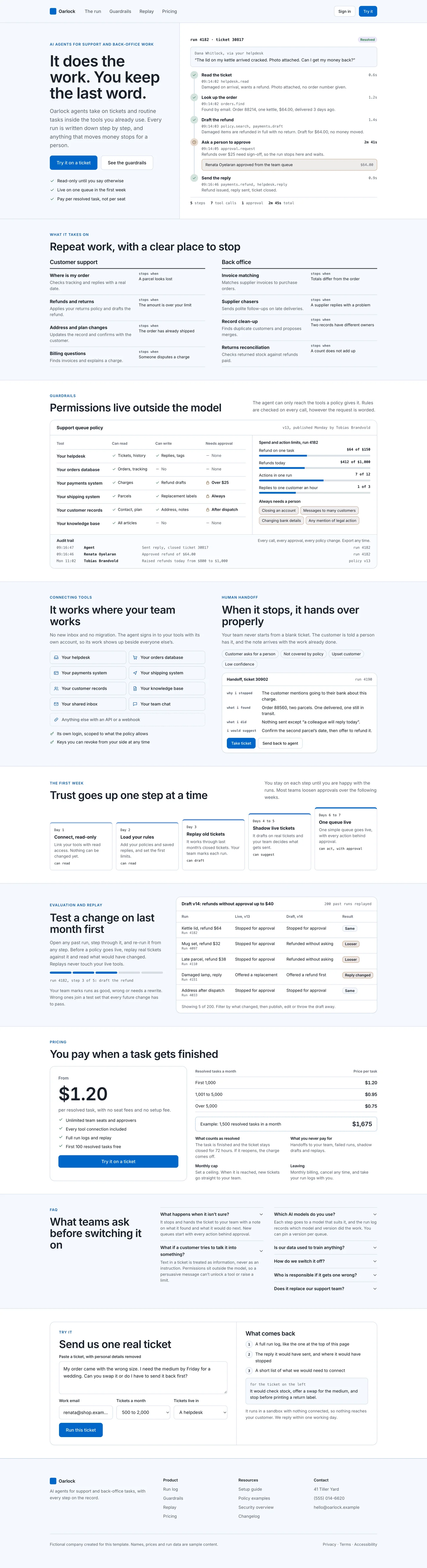
AI agent website home page website template for a mobile website, designed for Oarlock, a fictional ai business. Shows an ai agent product page built around one visible run: navigation with try-it button, a split hero whose right half is a coded run log of one refund ticket with steps, tools, durations and a human approval, a jobs index for support and back-office work with where each one stops, a guardrails panel with a tool permission matrix, spend and action limits, an always-needs-a-person list and an audit trail, connecting your tools beside a human handoff note, a five-step first-week staircase, evaluation by replaying past runs against a draft policy, pricing per resolved task with volume tiers and what counts as resolved, faq, a try-it form with a pasted ticket, footer. Minimal style: cool neutrals, Inter, 8px corners and soft shadows. A complete, responsive one-page HTML template (every section, light and dark) with a DESIGN.md of light and dark colour tokens.
- Pattern
- AI agent website
- Device
- Mobile
- Style
- Minimal
- Product (fictional)
- Oarlock
- Category
- AI
Spec
- Colours (light)
- background
#f4f8fe· surface#ffffff· text#19212b· muted#5a6472· primary#0066c7· accent#806ccd - Colours (dark)
- background
#080d14· surface#141b24· text#eef2f6· muted#a9b2be· primary#6daeff· accent#b8aaff - Fonts
- Inter (headings and body), JetBrains Mono (code) · Google Fonts, under their own licences
- Sections
- hero, use cases, guardrails, connect, first week, replay, pricing, FAQ, try it, footer
- Light and dark
- Both included; follows the system setting
- Responsive
- One HTML file, layout changes at 1024px, 960px and 760px; no horizontal scroll at 320px
- Best for
- An AI agent product for support teams that wants a calm, plain look with plenty of space.
- Not ideal for
- A product that wants a bold, image-led brand look.
Build this with your AI
Add the Made Good Designs library to your assistant once. Then ask for UI references, brand palettes, font pairings and design tokens in any chat.
https://madegooddesigns.com/inspiration/mcp?ref=ui-ai-agent-website-templateSettings → Connectors → Add custom connector → paste the URL.
Settings → Apps & Connectors → Advanced → Developer mode → Create → paste the URL.
One click, then confirm in Cursor.
One click, then confirm in VS Code (Copilot agent mode).
claude mcp add --transport http made-good-designs https://madegooddesigns.com/inspiration/mcp?ref=ui-ai-agent-website-template
gemini mcp add --transport http made-good-designs https://madegooddesigns.com/inspiration/mcp?ref=ui-ai-agent-website-template
Add this to the app's MCP config (Windsurf: mcp_config.json).
Fonts: Inter (Google Fonts)
Prompt copied: paste it into the chat that just opened.
Writing about this template?
More ai agent website templates







search_ui_screens (e.g. “billing settings, editorial style”), get_ui_flow for a whole journey, and get_ui_screen_code to pull the HTML and DESIGN.md straight into your project.