Landing Page Design: A Complete Guide for 2026
Good landing page design does one job: it moves a single visitor toward a single action. Not five actions, not a tour of your company history — one. The pages that convert in 2026 are the ones that respect that constraint ruthlessly, and the ones that flop are usually the ones trying to be a homepage, a brochure, and a blog post at the same time.
This guide walks through the anatomy of a high-converting landing page, the layout decisions that actually move the needle, the copy and visual hierarchy that carry the message, and how to test your way to better numbers. It is the pillar for our marketing-design cluster, so we link out to the supporting pieces — CTA button design, email design, banner ad design, and newsletter design — as we go.
What a Landing Page Actually Is
A landing page is a standalone page built for one campaign and one conversion goal. Someone clicks an ad, an email link, or a search result and “lands” here. Unlike a homepage, it usually strips out the global navigation, sidebars, and competing links so the visitor has nowhere to wander except toward the action you want — a signup, a purchase, a demo booking, a download.
There are broadly two types. A lead-generation page trades something (an ebook, a trial, a quote) for contact details via a form. A click-through page warms the visitor up and sends them onward to a checkout or signup flow. Knowing which one you are designing changes everything downstream: a lead-gen page lives and dies by its form, while a click-through page lives and dies by its single button.
The Anatomy of a High-Converting Page
Most landing pages that perform share the same skeleton, top to bottom:
- Hero section — headline, subhead, primary visual, and the first call to action, all visible without scrolling on most screens.
- Value proposition — three to five benefit-led blocks that explain what the visitor gets, not what your product does internally.
- Social proof — testimonials, logos, ratings, or numbers that lower the perceived risk.
- How it works — a short, scannable sequence that removes uncertainty about what happens after they click.
- Objection handling — an FAQ or comparison that answers the “yes, but…” questions before they kill the conversion.
- Closing CTA — a final, restated call to action so people who scrolled the whole page do not have to scroll back up.
You do not need every block on every page. A page for a free newsletter signup can be the hero plus one proof element. A page selling a $2,000 course needs every section above and probably a video. Match the page length to the size of the ask.
The Hero Section: Earning the Scroll
The hero is the part of landing page design that determines whether anyone reads the rest. You have a few seconds. Three elements do the heavy lifting:
The headline states the outcome in plain language. “Send invoices in 30 seconds” beats “Next-generation billing infrastructure.” Lead with the benefit, name the audience if it sharpens relevance, and keep it under about ten words so it reads at a glance.
The subhead earns the next breath. Use it to add the one piece of context the headline could not carry — who it is for, what makes it different, or the price if price is a selling point.
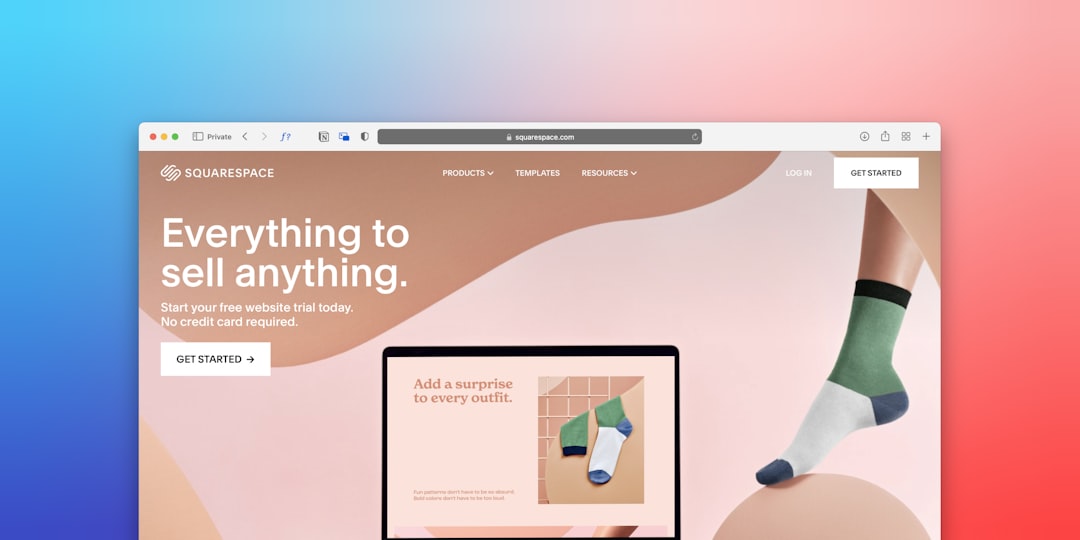
The hero visual should show the product or the result, not a stock photo of people high-fiving. A screenshot, a short looping demo, or a clean product shot does more work than any abstract illustration. If you must use photography, use real photography of your actual thing.
Keep the primary call to action in the hero, and make it the most visually dominant element on the screen after the headline. We go deep on the button itself in our guide to CTA button design — the short version is high contrast, action-first label, and breathing room around it.
Layout and Visual Hierarchy
Hierarchy is the order in which the eye notices things. On a landing page you want that order to be: headline, CTA, supporting visual, then everything else. You build it with size, weight, contrast, and white space — the same fundamentals we cover in our UI design principles guide.
A few layout rules that hold up across industries:
- One column on mobile, considered grids on desktop. Most traffic is mobile, so design the single-column flow first and expand outward.
- Generous white space. Crowding kills scannability. Let each section breathe so the eye knows where one idea ends and the next begins.
- Directional cues. Images of people looking toward the CTA, arrows, or simple alignment can guide attention without the visitor noticing.
- Consistent type scale. Two type sizes for headings and one for body, used consistently, reads far calmer than six ad-hoc sizes.
Type matters more than most marketers think. A clear, high-x-height sans like Inter (free, Google Fonts) for body copy and a slightly more characterful face for headlines is a safe, professional pairing that loads fast and reads well at small sizes.
Copy That Carries the Design
No layout saves weak copy. Write the words first, then design around them. The strongest landing page copy is specific, customer-language, and benefit-led. Replace “robust analytics suite” with “see which campaign actually paid for itself.” Replace “industry-leading support” with “talk to a real person in under two minutes.”
Structure body copy for scanning, not reading. Short paragraphs, descriptive subheadings, and bulleted benefit lists let someone skim the page in fifteen seconds and still get the gist. The visitor who wants detail can slow down; the visitor in a hurry still converts.
Match the page to its source. If your email campaign promised “20% off your first order,” the landing page headline should echo that promise word-for-word. This “message match” between the ad or email and the page is one of the most reliable ways to lift conversion — broken continuity is one of the fastest ways to lose it.
Social Proof and Trust Signals
People convert when the perceived risk drops below the perceived reward. Trust signals lower that risk:
- Testimonials with a real name, role, and photo beat anonymous praise. Specific quotes (“cut our onboarding from a week to a day”) beat vague ones (“great product”).
- Customer logos borrow credibility, but only use ones the visitor will recognize or that match their industry.
- Numbers — users served, ratings, money saved — work when they are real. Frame any figure honestly; an inflated stat that gets disproven costs you the sale and the trust.
- Guarantees and reassurances near the CTA — “no card required,” “cancel anytime,” “30-day refund” — remove the last hesitation at the exact moment of decision.
Forms and Friction
On a lead-gen page, the form is where conversions are won or lost. The rule is simple: ask for the minimum you genuinely need. Every extra field measurably reduces completions. If you only need an email to start, ask only for an email and collect the rest later.
Practical form tips:
- Label fields clearly above the input, not as placeholder text that vanishes when typing.
- Show inline validation so errors surface as the user types, not after they hit submit.
- Make the submit button a benefit, not “Submit” — “Get my free quote” tells them what happens next.
- On mobile, trigger the correct keyboard (email, number) for each field type.
Designing for Mobile First
The majority of landing-page traffic in 2026 arrives on a phone, so the mobile experience is the real experience and the desktop layout is the adaptation. Design the single-column mobile flow first. Keep the primary CTA reachable with a thumb, watch your tap-target sizes, and make sure the hero message survives a 360-pixel-wide screen without the visual eating the headline.
Performance is part of mobile design. Compress images, lazy-load anything below the fold, and keep your font files lean. A page that takes four seconds to paint loses a meaningful share of visitors before they ever see your beautiful hero — speed is a design decision, not just an engineering one.
Testing and Iterating
Landing page design is never finished; it is tuned. Once a page is live with real traffic, A/B testing tells you what your taste cannot. Test one meaningful element at a time — the headline, the hero image, the CTA label, the form length — so you can attribute any change to a cause.
Prioritize tests by leverage. The headline and the primary CTA affect everyone who lands; a footer link affects almost no one. Run each test until you have enough traffic to trust the result rather than calling it after a good morning. And feed winners back into your banner ads and emails so your whole funnel speaks with one voice.
Designing for Trust and Brand Consistency
A landing page is often the first real impression a visitor has of your business, and that impression forms in milliseconds. A page that looks cheap, mismatched, or hastily assembled undermines even the strongest offer, because the visitor unconsciously reads visual quality as a proxy for product quality. Polish is persuasion.
Consistency carries that polish. The colors, type, logo, and tone on the page should match the ad, email, or search result that sent the visitor — and match your wider brand. When someone clicks an ad with a particular look and lands on a page that looks and sounds completely different, the disconnect creates doubt at the worst possible moment. Treat your campaign as a single visual system: the banner, the email, and the landing page should feel unmistakably like the same source.
Small trust details add up. A real photo of your team, a visible privacy assurance near a form, a working chat or contact option, and clean, error-free copy all signal that a real, competent business is on the other end. None of these are flashy, but collectively they remove the friction of doubt that quietly kills conversions.
Accessibility Is Conversion Insurance
An accessible landing page is not just an ethical baseline — it converts more people, because more people can actually use it. Designing for accessibility overlaps almost entirely with designing for clarity, so the work pays off twice.
- Color contrast. Ensure text and especially your CTA meet contrast standards so they are readable for everyone, including the large share of users with some degree of low vision.
- Readable type. Adequate body sizes and line spacing help every visitor, not only those with visual impairments.
- Keyboard and screen-reader support. Forms with proper labels and a logical focus order let assistive technology complete the conversion.
- Descriptive alt text. Meaningful image descriptions keep the message intact when images fail to load.
The same principles that make a page usable for someone with a disability — clear contrast, obvious hierarchy, descriptive labels — make it faster and easier for everyone to act. Accessibility and conversion optimization point in the same direction.
Common Mistakes to Avoid
- Multiple competing CTAs. Two goals halve your conversion on both. Pick one.
- Keeping the full site navigation. Every nav link is an exit. Strip it on dedicated campaign pages.
- Burying the offer. If the visitor cannot tell what you want them to do in five seconds, the design failed.
- Stock-photo hero. Show the actual product or result.
- Ignoring page speed. A slow page is a low-converting page regardless of how it looks.
Frequently Asked Questions
What makes a landing page different from a homepage?
A landing page targets one campaign and one conversion goal, usually with the global navigation removed so visitors cannot wander off. A homepage serves many audiences and goals at once and acts as a hub. Landing pages are focused; homepages are broad.
How long should a landing page be?
Match length to the size of the ask. A free newsletter signup may need only a hero and one proof element. A high-priced product needs value props, social proof, objection handling, and a closing CTA. Let the price and complexity of the offer decide.
Where should I put the call to action?
Always place a primary CTA in the hero section, visible without scrolling, and repeat it at the end of the page so visitors who read everything do not have to scroll back. For longer pages, a third CTA in the middle is reasonable — just keep them all pointed at the same single action.
How do I improve a landing page that is not converting?
Start with the highest-leverage elements: headline clarity, message match with the ad that sent traffic, and the primary CTA. Check page speed and mobile layout, reduce form fields to the essentials, and add specific social proof. Then A/B test one change at a time and keep the winners.