UX vs UI Design: What’s the Difference?
The terms UX and UI are often used interchangeably, but they represent fundamentally different disciplines within digital design. UX design (user experience design) focuses on how a product feels to use — the logic, flow, and structure that guide a person from point A to point B. UI design (user interface design) focuses on how that product looks — the buttons, typography, colours, and visual elements a user actually sees and interacts with. Understanding the difference between UX and UI is essential whether you are hiring a designer, choosing a career path, or simply trying to build a better digital product.
In practice, the two disciplines are deeply intertwined. A beautiful interface means nothing if users cannot figure out how to complete a task, and a logically sound experience falls flat if the visual layer is confusing or unappealing. This guide breaks down each role, highlights the key differences, explores where they overlap, and offers practical advice for anyone considering a career in either field.
What Is UX Design?
User experience design is the process of shaping every aspect of a person’s interaction with a product, service, or system. The term was coined by Don Norman in the mid-1990s while he was working at Apple, and it intentionally casts a wide net. UX encompasses research, information architecture, interaction design, usability testing, and content strategy — anything that influences how someone perceives and navigates a product.
Core Responsibilities of a UX Designer
A UX designer’s day-to-day work typically includes:
- User research: Conducting interviews, surveys, and observational studies to understand what real people need and where current solutions fall short.
- Personas and journey maps: Synthesising research into actionable models that keep the team focused on actual user behaviour rather than assumptions.
- Information architecture: Organising content and features into a structure that feels intuitive — deciding what goes where, how navigation works, and how pages or screens relate to one another.
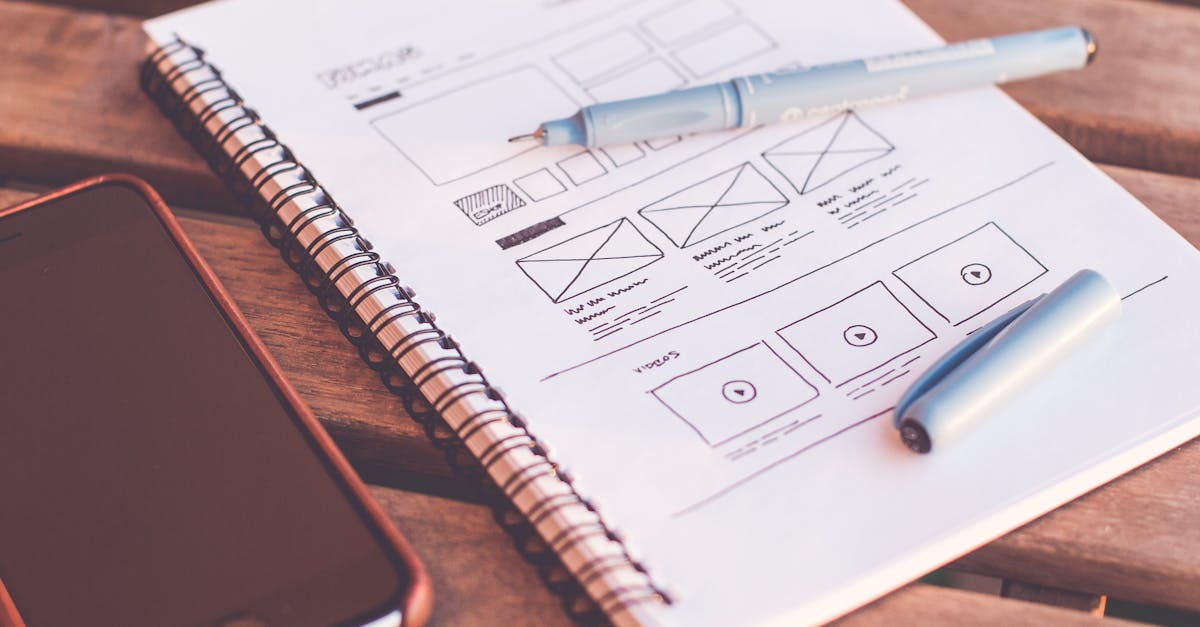
- Wireframing and prototyping: Creating low-fidelity sketches and interactive prototypes that illustrate the flow and functionality before any visual design work begins.
- Usability testing: Putting prototypes in front of real users, observing where they struggle, and iterating based on the findings.
The critical takeaway is that UX design is problem-centred. It starts by asking “What does the user need?” and works outward from there. Visual aesthetics are secondary at this stage; the priority is ensuring the product’s structure and logic serve the user effectively.
The UX Design Process
Most UX practitioners follow a variation of the design thinking framework: empathise, define, ideate, prototype, and test. The process is deliberately cyclical. Insights from testing feed back into the define and ideate stages, and the product evolves through repeated iterations rather than a single, linear push from concept to launch.
A well-crafted design brief often serves as the starting point, aligning stakeholders on the problem the product needs to solve before any design work begins.
What Is UI Design?
User interface design is the craft of translating a product’s structure and functionality into a visual, interactive layer. If UX design determines that a checkout process should have three steps, UI design decides what those three screens look like — the colour of the buttons, the size of the headings, the spacing between form fields, and the micro-animations that provide feedback when a user takes an action.
Core Responsibilities of a UI Designer
A UI designer’s work typically includes:
- Visual design: Choosing colour palettes, typography, iconography, and imagery that align with the brand and create the desired emotional tone.
- Component design: Building reusable elements — buttons, cards, modals, form inputs — that maintain consistency across the entire product.
- Design systems: Documenting these components, along with spacing rules, colour tokens, and interaction patterns, so that the design scales consistently as the product grows.
- Responsive layouts: Ensuring the interface works gracefully across screen sizes, from mobile phones to large desktop monitors, following responsive web design principles.
- Interaction design and motion: Defining hover states, transitions, loading animations, and other micro-interactions that make the interface feel polished and responsive.
UI design draws heavily on traditional graphic design principles — contrast, alignment, repetition, proximity — and applies them to interactive, screen-based contexts. A strong sense of visual hierarchy is essential, because users need to instantly understand what is most important on any given screen.
Tools of the Trade
UI designers typically work in tools such as Figma, Sketch, or Adobe XD. These applications allow designers to create pixel-perfect mockups, build interactive prototypes, and hand off detailed specifications to developers. Many UI designers also have a working knowledge of HTML, CSS, and front-end frameworks, which helps them design interfaces that are technically feasible and easy to implement.
Key Differences Between UX and UI Design
While the two roles collaborate closely, several fundamental differences set them apart:
Focus and Scope
UX design is concerned with the entire experience — it can extend beyond screens to include onboarding emails, customer support flows, and even physical touchpoints. UI design is focused specifically on the visual and interactive layer of a digital product. Think of UX as the blueprint of a house and UI as the interior design.
Process and Deliverables
UX designers produce research reports, user personas, journey maps, sitemaps, wireframes, and low-fidelity prototypes. UI designers produce style guides, design systems, high-fidelity mockups, icon sets, and annotated screens ready for development. The deliverables reflect the difference in focus: one set defines what happens, the other defines how it looks.
Skills and Mindset
UX design leans more heavily on analytical and strategic thinking — empathy, research methodology, systems thinking, and the ability to synthesise complex data into clear insights. UI design leans more toward craft and aesthetics — colour theory, colour psychology, typography, layout composition, and an eye for detail. Both roles require strong communication skills, because designers in either discipline must present and defend their decisions to stakeholders and developers.
When Each Role Takes the Lead
In a typical product design process, UX work tends to lead. Research and wireframing happen first, establishing the product’s structure and flows. UI design follows, giving those structures visual form. However, the process is rarely linear. UI designers often identify usability issues while working on the visual layer, and UX designers may revisit flows after seeing how they look in high fidelity.
How UX and UI Work Together
The best digital products are the result of tight collaboration between UX and UI — not a rigid handoff from one to the other. In practice, the two disciplines overlap significantly, and many designers work across both.
The Product Design Process
A healthy product design workflow generally looks like this:
- Discovery: UX researchers gather insights about user needs, business goals, and competitive landscape.
- Definition: UX designers synthesise findings into problem statements, user flows, and information architecture.
- Wireframing: Low-fidelity layouts are created to test structure and flow.
- Visual design: UI designers apply branding, colour, typography, and component design to the wireframes.
- Prototyping and testing: High-fidelity prototypes are tested with real users; both UX and UI iterate based on feedback.
- Handoff and implementation: Detailed specs and assets are delivered to development, and both designers support the build.
At every stage, communication between UX and UI is essential. A wireframe that looks simple on paper may present visual design challenges; a stunning visual concept may introduce usability problems that research would flag. The iterative loop between the two disciplines is what produces products that are both functional and delightful.
The Rise of the Product Designer
In many companies, particularly startups and mid-sized firms, the distinction between UX and UI has blurred into a single role: product designer. A product designer is expected to handle both the strategic, research-driven aspects of UX and the visual, craft-driven aspects of UI. This hybrid role reflects the reality that separating the two can create silos and slow down the design process.
That said, at larger organisations with complex products, specialisation still matters. A dedicated UX researcher can go deeper into user behaviour than a generalist, and a dedicated UI designer can build and maintain a design system with more rigour.
Common Misconceptions
One persistent misconception is that UX is the “thinking” part and UI is the “making” part. In reality, both roles involve significant thinking and making. UI designers make countless strategic decisions about how visual elements guide behaviour — choosing a red button over a grey one is not just an aesthetic preference; it is a deliberate choice rooted in colour psychology and conversion strategy. Similarly, UX designers produce tangible artefacts — wireframes, prototypes, journey maps — that require craft and precision.
Another misconception is that UX design is only about digital products. While UX is most commonly associated with apps and websites, the principles apply to any experience — a retail store layout, a restaurant menu, an airline boarding process, or a government form. The digital focus is a practical reality of the current job market, but the discipline’s scope is broader than screens.
Finally, some people assume that UX and UI are sequential — that UX finishes before UI begins. In practice, the best teams work in parallel and iterate together. A UI designer’s visual explorations may reveal structural issues that the UX designer needs to address. A UX researcher’s late-stage findings may require both the flow and the interface to change. The process is collaborative and cyclical, not a relay race.
Career Paths and Skills
Becoming a UX Designer
UX design attracts people from a wide range of backgrounds — psychology, anthropology, library science, journalism, and even customer service. The common thread is an interest in understanding people and solving problems on their behalf. Key skills to develop include:
- User research methods (interviews, surveys, usability testing)
- Information architecture and content strategy
- Wireframing and prototyping tools (Figma, Axure, Balsamiq)
- Data analysis and A/B testing
- Stakeholder communication and facilitation
Building a strong portfolio is critical. UX portfolios should showcase the process — research findings, iterations, and the reasoning behind design decisions — not just final screens.
Becoming a UI Designer
UI design draws people with a background in graphic design, fine art, or visual communication. The role rewards a keen eye for detail and a deep understanding of visual systems. Key skills include:
- Typography, colour theory, and layout composition
- Design system creation and maintenance
- High-fidelity prototyping and interaction design
- Understanding of front-end technologies (HTML, CSS, JavaScript basics)
- Brand application and visual consistency
UI portfolios should demonstrate craft — polished, pixel-perfect work — alongside the ability to think systematically about components and scalability.
Salary and Job Market
Both UX and UI designers are in strong demand. Salaries vary by region and experience, but mid-level UX designers in the United States typically earn between $85,000 and $120,000 annually, while mid-level UI designers fall in a similar range. Senior and lead positions, particularly those with product design titles that encompass both disciplines, can command significantly more. The job market favours designers who can demonstrate both strategic thinking and craft execution, regardless of which title they hold.
Frequently Asked Questions
Can one person do both UX and UI design?
Yes, and many do. The product designer role combines both disciplines, and it is one of the most common design titles in the tech industry. However, doing both well requires a broad skill set. Some designers find they naturally gravitate toward one side — either the research and strategy of UX or the visual craft of UI — and choose to specialise as they advance in their careers.
Which should I learn first, UX or UI?
Starting with UX fundamentals is often recommended, because understanding user needs and product structure gives you a foundation that makes your UI work more purposeful. That said, if you come from a visual design background, you may find it more natural to start with UI and gradually expand into UX research and strategy. Either path is valid.
Do UX designers need to know how to code?
Coding is not a requirement for UX designers, but a basic understanding of front-end development helps. Knowing what is easy or difficult to build allows UX designers to propose solutions that are feasible within project constraints. The same applies to UI designers — familiarity with HTML, CSS, and web design fundamentals makes handoffs smoother and reduces friction with development teams.
Is UX design more important than UI design?
Neither is more important; they are complementary. A product with excellent UX but poor UI will feel unpolished and struggle to build trust. A product with stunning UI but poor UX will frustrate users and drive them away. The most successful digital products invest equally in both, recognising that experience and interface are two sides of the same coin.


