Textile Design Basics for Beginners
Textile design is the art and craft of creating patterns, colors, and structures for cloth — whether the design is printed onto fabric, woven into it, or knitted from yarn. It sits at the intersection of visual design and material reality: a print that looks perfect on screen can fall apart on a stretchy knit or a coarse weave. This beginner guide explains the core categories, how repeats translate to fabric, and what you need to start designing for textiles.
For the broader discipline of building repeats and motifs, see our complete guide to pattern design. Here we focus on what changes when your canvas becomes cloth.
The Three Branches of Textile Design
Textile design splits into three main approaches, defined by how the design enters the fabric:
| Type | How the design is made | Designer’s main concern |
|---|---|---|
| Printed | Artwork is printed onto finished cloth (digital, rotary, or screen). | Repeat, color count, registration, DPI. |
| Woven | Color and pattern come from interlacing warp and weft yarns. | Weave structure, yarn color, thread count. |
| Knitted | Pattern is built from interlocking loops of yarn. | Stitch structure, stretch, gauge. |
Most graphic designers entering the field start with printed textiles, because the skills overlap directly with surface pattern work — you build a seamless tile and a printer applies it. Woven and knit design require thinking in yarn and structure rather than flat artwork, and are closer to engineering the fabric itself.
Printed Textiles: Where Most Designers Begin
In printed textile design, you create a repeating tile and a manufacturer prints it onto cloth. The craft is identical to building any seamless pattern — our tutorial on how to make a seamless pattern covers the offset method and Illustrator’s Pattern tool — but a few fabric-specific factors matter:
- Print method. Digital printing handles unlimited colors and fine detail; rotary and screen printing are economical at volume but limit you to a fixed number of spot colors.
- Registration. In multi-color screen printing, each color is a separate screen; designs must tolerate slight misalignment between them.
- Hand and drape. The same print reads differently on stiff cotton versus flowing silk; consider the fabric weight your design will live on.
Woven and Knitted Textiles
In woven fabric, the pattern is not printed on top — it is the structure. Threads running lengthwise (the warp) interlace with threads running across (the weft), and the weave pattern plus yarn colors create the design. Plaids, ginghams, herringbones, and jacquards are all woven effects, and the designer specifies thread colors and the interlacing structure rather than drawing a flat image.
Knitted fabric is built from loops rather than crossed threads, which is what gives it stretch. Knit designs deal with stitch patterns, gauge, and how a motif distorts when the fabric stretches. Both woven and knit work require thinking about the material’s behavior, not just its surface.
Repeats and Scale on Fabric
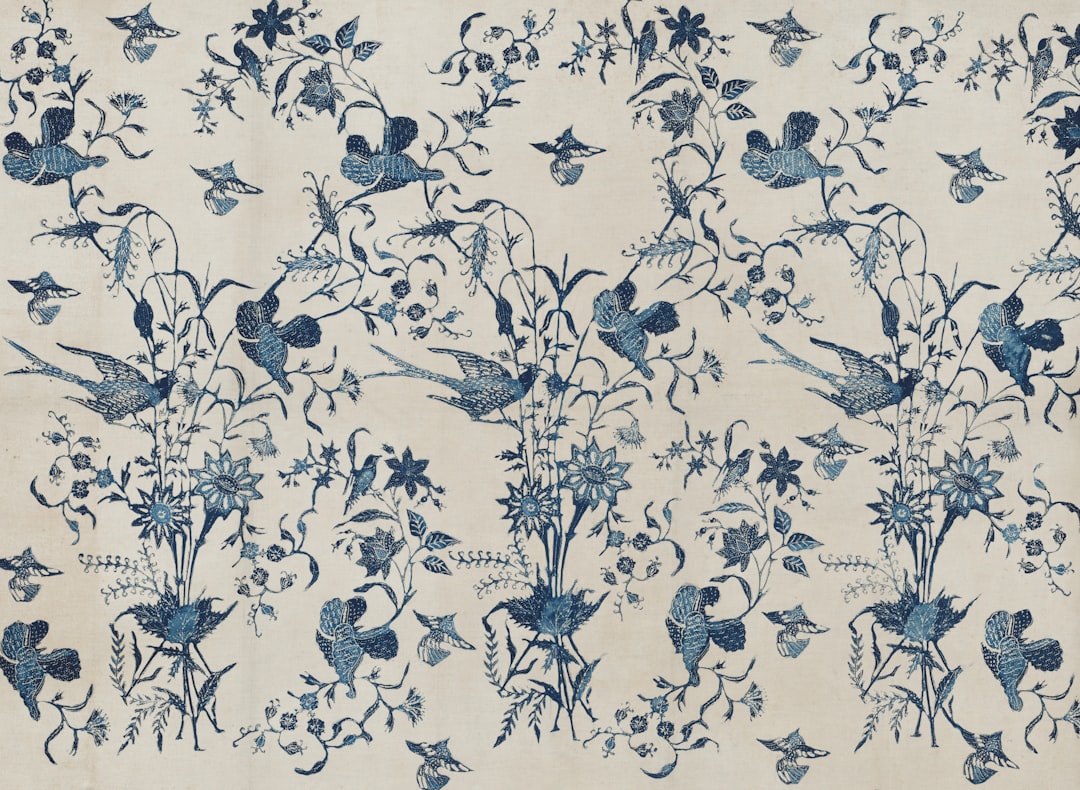
The repeat types you use for any pattern apply to textiles too: full drop, half-drop, brick, mirror, and tossed. The half-drop remains the textile workhorse because it disguises the grid and reads as a natural, dense field. For a full breakdown with examples, see repeat patterns explained with examples.
Scale is where beginners stumble most. A motif that looks balanced at screen size can read as an indistinct blur once printed small on fabric, or as oversized blobs if printed large. Always:
- Preview at true print size rather than fit-to-screen.
- State your repeat size in inches or centimeters so the manufacturer knows the scale.
- Use the right resolution — commonly 150 DPI at final print size for fabric, sometimes 300 DPI.
Classic Textile Motifs and Styles
Learning the named styles helps you communicate with buyers and manufacturers. The classics recur across decades of fabric:
- Ditsy — small, densely packed florals; a staple of dress and quilting cotton.
- Foulard — tidy small geometric or paisley motifs, the classic necktie look.
- Damask — large, symmetrical, often tone-on-tone ornament built on a mirror repeat.
- Ikat — feathered, blurred edges mimicking the resist-dyeing of woven ikat cloth.
- Paisley — the curved teardrop motif with deep textile roots.
- Plaid and gingham — woven check structures, also imitated as prints.
Tools for Textile Design
For printed textiles, the standard graphic tools apply:
- Adobe Illustrator — vector repeats with the live Pattern tool; ideal for crisp motifs and easy recoloring.
- Adobe Photoshop — painterly and textured prints; the Offset filter heals tile seams.
- Procreate — paint motifs on iPad, then assemble repeats in Illustrator or Photoshop.
- Affinity Designer — a no-subscription vector alternative.
Woven and knit design often use specialized CAD software that simulates yarn and weave structure, but you can begin printed textile design with the tools you likely already own.
From Design to Fabric
Once your tile is clean and production-ready, the easiest way to see it on real cloth is print-on-demand. Platforms like Spoonflower let you upload a seamless tile, choose a fabric base, set the repeat scale, and order a swatch — a low-risk way to test how your design behaves on different materials before committing. From there you can build a collection and pursue licensing. The commercial workflow is covered in our guide to surface pattern design for beginners.
Beginner Mistakes to Avoid
- Designing at the wrong scale — always check true print size on the target fabric.
- Too many colors for the print method — confirm spot-color limits before finalizing.
- Ignoring fabric behavior — a print for stretchy knit must tolerate distortion.
- Visible seams — tile-test before exporting; heal the offset edges.
- Low resolution — match the manufacturer’s DPI at final print size.
Frequently Asked Questions
What is textile design?
Textile design is the creation of patterns, colors, and structures for cloth. It covers printed textiles, where artwork is applied to finished fabric; woven textiles, where pattern comes from interlacing yarns; and knitted textiles, built from loops of yarn. Designers balance visual appeal with how the fabric behaves when made and worn.
What is the difference between textile and surface pattern design?
Surface pattern design covers any printed surface — fabric, wallpaper, packaging, and more. Textile design is specifically about cloth, and includes woven and knit structures where color comes from yarn rather than print. Printed textile design overlaps almost entirely with surface design, while woven and knit work require thinking in yarn and structure.
Do I need special software for textile design?
For printed textiles, standard tools like Adobe Illustrator, Photoshop, Procreate, or Affinity Designer are enough to build seamless repeats. Woven and knitted textile design typically use specialized CAD software that simulates yarn and weave structure, but beginners can start with printed design using software they already have.
How do I see my design on real fabric?
The simplest route is print-on-demand. Platforms like Spoonflower let you upload a seamless tile, pick a fabric base, set the repeat scale, and order a swatch. Ordering a small test print is the best way to check how scale, color, and detail translate before producing a full collection.
What resolution do I need for fabric?
Many fabric printing processes ask for 150 DPI at the final print size, while some request 300 DPI. The key is that resolution is measured at actual print dimensions, not on a zoomed-in screen view. Always confirm the exact DPI and repeat size with your manufacturer or print-on-demand platform first.