Event Program Design: Layouts and Tips
Event program design is the printed guide that walks guests through what is happening and when — a wedding ceremony’s order of service, a conference agenda, a gala’s run of show. Unlike a single invitation, a program is usually multi-page, which makes layout discipline and a consistent grid the make-or-break factor. This guide covers the formats, sizes, structure, and typography that turn a list of events into a polished, easy-to-follow program.
For the shared fundamentals of sizes, paper, and printing that underpin all event stationery, see our complete guide to invitation design. This article focuses on multi-page programs specifically.
Choosing a Program Format
The format follows the amount of content. A short ceremony fits on a single folded sheet; a full-day conference needs a stitched booklet. The main options:
- Flat card — a single 5×7 panel for a brief, simple order of events.
- Folded program — an A2 or 5×7 folded sheet giving four panels; the wedding-ceremony default.
- Booklet — saddle-stitched pages (always a multiple of four) for agendas, gala run-of-show, and detailed programs.
- Fan / single-handle program — a card on a stick, popular for warm outdoor ceremonies.
| Format | Typical size (in) | Best for |
|---|---|---|
| Flat card | 5 × 7 | Short ceremonies, simple agendas |
| Folded (4 panels) | 4.25 × 5.5 folded | Wedding order of service |
| Booklet | 5.5 × 8.5 (half-letter) | Conferences, galas, recitals |
Structure the Content First
A program is information design before it is graphic design, so map the content before opening a layout tool. Sequence is everything — guests use the program to follow along in real time, so the order on the page must match the order of the event exactly.
- Cover — event name, names or hosts, date and location. One strong focal element.
- Order of events / agenda — the core: each segment with its time and, where relevant, who is leading it.
- People — wedding party, speakers, performers, or honorees.
- Extra content — readings, lyrics, sponsor thanks, a map, or an in-memoriam note.
- Back cover — a closing note, hashtag, or quiet credit.
Build on a Grid
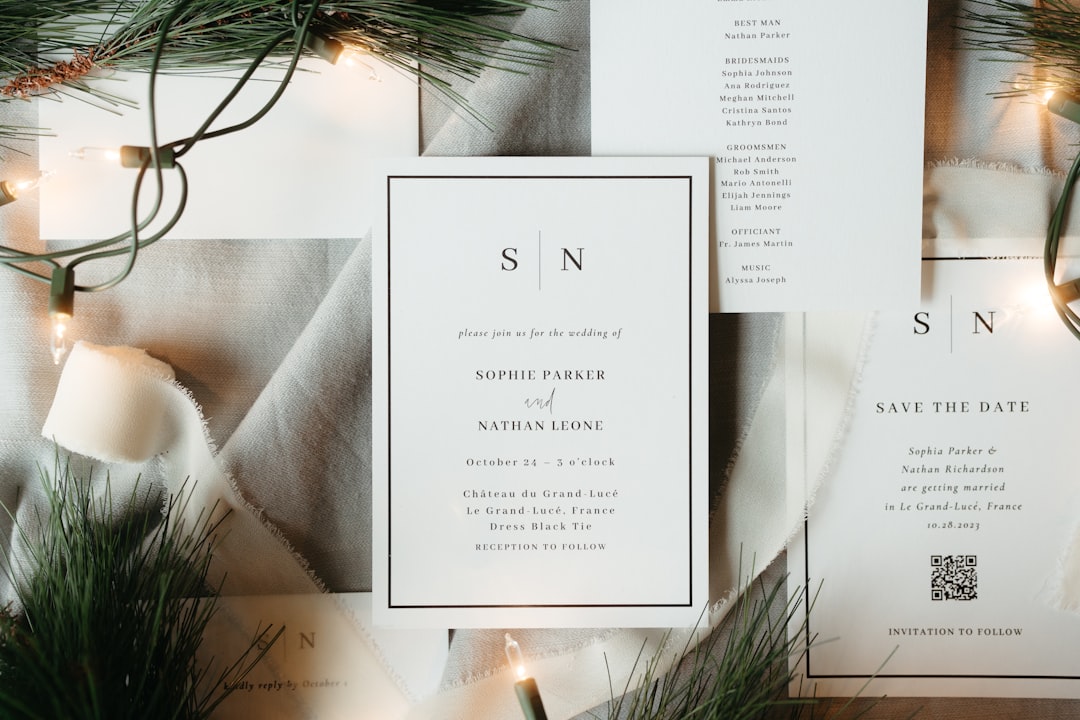
Multi-page consistency comes from a grid. Set your margins and columns once and reuse them on every page so headers, times, and body text land in the same place throughout. For an order of service, a two-column structure — segment names on the left, descriptions or performers on the right — reads cleanly and keeps timing scannable. Generous, consistent margins make a program feel composed rather than crammed.
Align times in a consistent position (a left-hand time column works well for agendas) so guests can find “what’s next” at a glance without re-reading. Consistency across pages is what makes a booklet feel professionally produced.
Typography for Programs
Because a program carries more text than a card, legibility outranks decoration. Pair a display face for the cover and section headers with a highly legible text face for the agenda body. A refined serif headline with a clean sans body is a dependable, readable combination; for a formal wedding, echo the invitation suite’s pairing — often a calligraphic script with a refined serif — so the program belongs to the same family.
Set body copy at a comfortable reading size, use bold or a larger weight for segment names, and keep descriptions lighter. Limit yourself to two type families and let weight and size build the hierarchy. For combinations that survive long runs of text, see our font pairing guide.
Paper and Printing
Match the stock to the format. A folded program holds its shape on 110–130lb cardstock, scored before folding for a clean crease. A booklet uses a heavier cover stock for the outer pages and a lighter text weight inside so it does not become bulky. Most programs print well as digital for full color and short runs; add a foil accent on the cover title for a premium touch without booklet-wide cost.
For multi-page work, lay out in Adobe InDesign, which manages master pages, page numbers, and booklet imposition cleanly; Canva handles single folded programs with print-ready export. Booklets must have a page count in multiples of four for saddle stitching — plan content to fit, adding a blank or a “notes” page if needed.
Designing for Real-Time Use
A program is read while something is happening, which is a different design problem from a card read at leisure. Guests glance down between moments to find “where are we now” and “what’s next,” so the layout must answer those questions in a fraction of a second. That is why a consistent time column and clear segment names matter more than decorative flourishes — anything that slows scanning works against the program’s actual job.
Account for the reading environment too. Ceremonies and galas are often dimly lit, so keep contrast strong and body type at a comfortable size. Outdoor daytime events introduce glare, which is one reason matte or uncoated stocks beat high-gloss for programs. If guests will hold the program for a long ceremony, a fan or single-handle format is genuinely practical, not just charming.
Accessibility and Legibility
A program that looks elegant but cannot be read fails. Prioritize legibility with a few concrete choices:
- Maintain strong contrast between text and background — pale grey on cream may photograph well but reads poorly in person.
- Avoid setting long passages in script. Reserve calligraphic faces for headers; keep body in a clean, legible text face.
- Keep line length comfortable — overly wide columns tire the eye on a multi-page booklet.
- Use generous leading so dense agendas do not feel cramped.
Common Program Mistakes
The recurring errors are easy to avoid once you know them. Inconsistent margins or shifting type sizes from page to page instantly betray an amateur layout. Cramming every detail onto the cover buries the focal point — keep it to event, names, and date. And mismatched timing between the printed order and the actual run of show frustrates guests, so confirm the final schedule before printing.
Designing a full event identity? Coordinate the program with the rest of the suite — pair it with matching menu design and, for celebrations, your wedding invitation design so every printed piece reads as one cohesive event.
Frequently Asked Questions
What size is an event program?
A simple order of service fits a 5×7 flat card or an A2 folded sheet (4.25×5.5 folded). Detailed programs use a saddle-stitched booklet, commonly half-letter (5.5×8.5). Choose the format by content volume: a folded sheet for short ceremonies, a booklet for conferences, galas, and recitals.
What should an event program include?
Include a cover with the event name, hosts, date, and location; the order of events or agenda with times; the people involved such as the wedding party, speakers, or performers; any extra content like readings or sponsor thanks; and a back cover with a closing note. Sequence must match the live event exactly.
How do you lay out a multi-page program?
Build on a consistent grid: set margins and columns once and reuse them on every page so headers, times, and body text land in the same place. A two-column structure with segment names on the left and details on the right reads cleanly. Booklets must have a page count in multiples of four for saddle stitching.
What paper should an event program use?
Use 110–130lb cardstock for a folded program, scored before folding for a clean crease. A booklet pairs a heavier cover stock with a lighter text weight inside to avoid bulk. Most programs print well digitally; a foil accent on the cover title adds a premium touch without raising the cost of the whole piece.
What software is best for designing an event program?
Adobe InDesign is the standard for multi-page programs because it manages master pages, page numbers, and booklet imposition cleanly. Canva handles single folded programs with print-ready export. Export a 300 DPI PDF with bleed, and for booklets confirm the page count is a multiple of four before printing.